YouTube GIF extension
GIF Comments is a free YouTube GIF extension for Chrome, Edge, Brave and Firefox. It adds the GIF button that YouTube's desktop site is missing, and the GIFs you post are real YouTube GIF comments that everyone sees, no extension needed on their side.
Free · v1.1.0 · Chrome, Edge, Brave, Firefox · Store listings in review, install in 1 minute
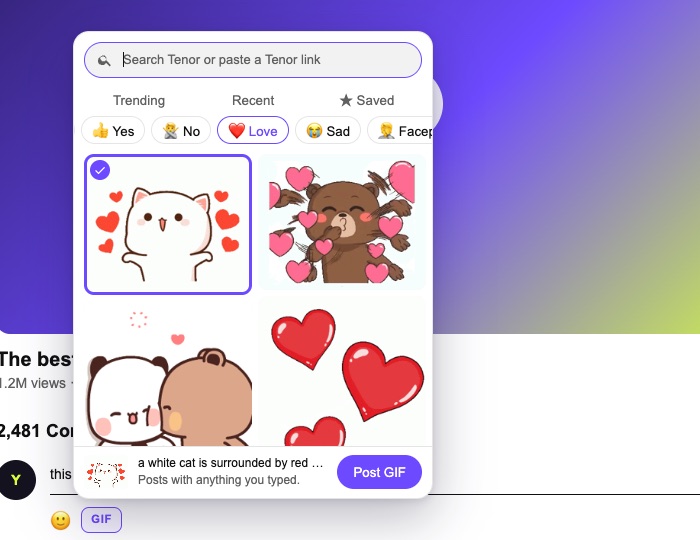
What you get
What the YouTube GIF extension does
Real GIF comments
It posts the same kind of GIF comment the YouTube app does, so everyone sees it, not only people with the extension.
All of Tenor
Search Tenor, paste a Tenor link, or tap a mood shortcut: LOL, Wow, Clap, Facepalm, Mind blown.
Select, then post
Clicking a GIF selects it; Post GIF sends it. A misclick never posts the wrong GIF.
Hide GIFs switch
Rather read text? One switch folds every GIF in the comments into a small Show chip.
Chrome, Edge, Brave, Firefox
How to install the YouTube GIF extension
The Chrome Web Store and Firefox Add-ons listings are in review. Until they go live, you load the download yourself; it takes a minute.
Free · v1.1.0 · Chrome, Edge, Brave, Firefox · Store listings in review, install in 1 minute
The Chrome Web Store and Firefox Add-ons listings are in review. Until they go live, you load the download yourself; it takes a minute.
- Download the ZIP and unzip it.
- Open chrome://extensions (edge://extensions in Edge, brave://extensions in Brave).
- Turn on Developer mode in the top right corner.
- Click Load unpacked and choose the unzipped folder (the one with manifest.json inside).
- Open YouTube. Pages that were already open get the button without a reload.
- Download the Firefox ZIP. You don't need to unzip it.
- Open about:debugging#/runtime/this-firefox.
- Click Load Temporary Add-on and choose the ZIP.
- Firefox removes temporary add-ons when it closes, so repeat this after a restart until the Firefox Add-ons listing is live.
Your options
YouTube GIF comments extension vs other ways
Four ways to post GIFs in YouTube comments, as of October 14, 2026.
| Option | Where | Everyone sees the GIF | How you install it | Hide GIFs |
|---|---|---|---|---|
| YouTube app | Phone and tablet | Yes | Built in, rolling out by account | No |
| GIF Comments (this one) | Chrome, Edge, Brave, Firefox | Yes | Store listings in review; ZIP until then | Yes |
| desktop_gifs (GitHub) | Chrome, Firefox | Yes | ZIP in developer mode; in Firefox it's removed on every restart | No |
| YouTube GIF Comments (older extension) | Chrome, Edge, Firefox | No: GIFs show only for people who have that extension | Store | No |
The older "YouTube GIF Comments" extension predates YouTube's own GIF comments: it posts a text tag that only its users see as a GIF. GIF Comments and desktop_gifs post real YouTube GIF comments.
Privacy
Is the YouTube GIF extension safe?
| It can | It can't and doesn't |
|---|---|
| Add a GIF button to comment boxes on youtube.com | Read your password, cookies or history |
| Add the chosen GIF to the comment YouTube's page sends | Post anything you didn't pick |
| Search Tenor (without your cookies) | Send data to a server of ours: there isn't one |
| Keep your saved and recent GIFs in your browser | Run on any site other than YouTube and gifcomments.com |
GIF Comments is independent, not made by YouTube or Google, and can stop working when YouTube changes its site; fixes ship as updates. Details in the privacy policy.
Phones
Is there a YouTube GIF extension for mobile?
Phones don't need one. YouTube GIF comments are built into the YouTube app on iPhone and Android and arrive with the rollout. Browser extensions only run on desktop browsers, and the mobile YouTube site isn't supported.
Questions
YouTube GIF extension: FAQ
Is the YouTube GIF extension free?
Yes, free, with no account, no sign-up and no ads.
Does it work in Firefox, Edge and Brave?
Yes. Edge and Brave use the Chrome version; Firefox has its own build, and its Firefox Add-ons listing is in review.
Can I see GIF comments without the extension?
Yes. youtube.com already shows GIF comments; the extension is only needed to post them from a computer.
Why does installing need developer mode?
Only until the store listings are approved. Then it's a one-click install with automatic updates.
What happens when YouTube adds its own desktop GIF button?
You can keep using either. The Hide GIFs switch keeps working on its own.
Get the GIF button on your computer
Free for Chrome, Edge, Brave and Firefox. Your GIFs show for everyone.